Streaming Objects with ProxyStore
Last updated 8 October 2026
This guide describes the motivation for and usage of ProxyStore's streaming interface.
Note
Some familiarity with ProxyStore is assumed. Check out the Get Started guide and Concepts page to learn more about ProxyStore's core concepts.
The StreamProducer
and StreamConsumer interfaces
decouple bulk object communication from event notifications through the use of
object proxies. This enables users to mix and match bulk object communication
methods (via the Connector
interface) and message stream brokers (via the
Publisher and
Subscriber interfaces).
Additionally, because the StreamConsumer
yields proxies of objects from the stream, bulk data transfer only occurs
between the source and true destination of the object from the stream
(i.e., the process which resolves the proxy from the stream).
Use Cases
The ProxyStore streaming interface can be used anywhere where one process
needs to stream objects to another process, and the interface can be used
to optimize the deployment via different
Connector and
Publisher/
Subscriber implementations.
But, this model is particularly powerful for applications which dispatch remote compute tasks on objects consumed from a stream. To understand why, consider the application in Figure 1 where Process A is a data generator streaming chunks of data (i.e., arbitrary Python objects) to Process B, a dispatcher which dispatches a compute task on a remote Process C using the data chunk.
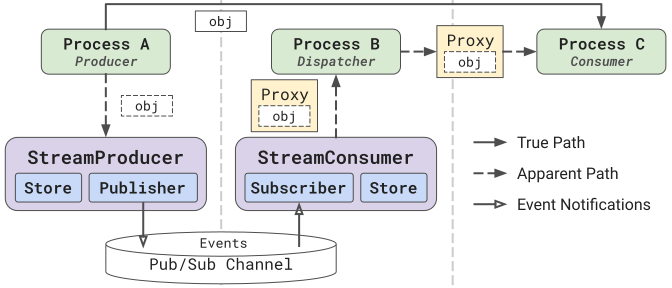
Figure 1: ProxyStore Streaming example.
In this scenario, while the dispatcher is consuming from the stream,
the dispatcher does not need to have the actual chunk of data; rather,
it only needs to know that a chunk is ready in order to dispatch a task
which will actually consume the chunk. This is where a stream of proxies
is beneficial---the processes reading from the
StreamConsumer is receiving
lightweight proxies from the stream and passing those proxies along to later
computation stages. The bulk data are only transmitted between the data
generator and the process/node computing on the proxy of the chunk, bypassing
the intermediate dispatching process.
Example
Here is an example of using the
StreamProducer
and StreamConsumer interfaces
to stream objects using a file system and Redis server.
This configuration is optimized for storage of large objects using the
file system while maintaining low latency event notifications via Redis
pub/sub. However, the configuration can easily be optimized for different
applications or deployments by using a different
Connector with the
Store for data storage and/or a different
Publisher and
Subscriber implementation for
event notifications via a message broker.
- The
Storeconfiguration is determined by the producer. TheStreamProduceris initialized with a mapping of topics to stores such that different communication protocols can be used for different topics. Consider using differentConnectorimplementations depending on your deployment or data characteristics. - The
Publisheris the interface to a pub/sub channel which will be used for sending event metadata to consumers. TheStreamProduceralso supports aggregation, batching, and filtering. - Instruct the producer to use a specific store for this topic name.
Alternatively,
default_storecan be passed to use a specific store for all topics. - The state of the
evictflag will alter if proxies yielded by a consumer are one-time use or not. - Closing the
StreamProducerwill close thePublisherby default. Passstores=Trueto also close theStoreinstances (and theirConnectorinstances). Closing a store created by the producer process, as here, also clears the objects in its connector if the connector clears by default (e.g., theFileConnector), so only close the stores once consumers are done with the stream. Topics are not closed by default and must be explicitly closed using thetopicsparameter orclose_topics(). Closing a topic will send a special end-of-stream event to the stream causing any consumers waiting on the stream to stop.
- The
Subscriberis the interface to the same pub/sub channel that the producer is publishing event metadata to. These events are consumed by theStreamConsumerand used to generate proxies of the objects in the stream. - The
StreamConsumerdoes not need to be initialized with aStore. Stream events will contain the necessary metadata for the consumer to get the appropriateStoreto use for resolving objects in the stream. - Iterating on a
StreamConsumerwill block until a new event is published to the stream and then yields a proxy of the object associated with the event. Iteration will stop once the topic is closed by theStreamProducer. - The yielded proxies point to objects in the
Store, and the state of theevictflag inside the proxy's factory is determined inStreamProducer.send(). - Closing the
StreamConsumerwill close theSubscriberby default. Passstores=Trueto also close theStoreinstances (and theirConnectorinstances) that the consumer made to resolve objects from the stream. These stores are created by the consumer from the stream events, so they are not theownerof the objects and closing them never clears the objects in the producer's store. Stores which already existed in the consumer's process, such as the producer's store when both run in the same process, are not closed.
Tip
By default, iterating on a
StreamConsumer yields
a proxy of the next object in the stream. The
iter_with_metadata(),
iter_objects(), and
iter_objects_with_metadata()
methods provide additional mechanisms for iterating over stream data.
Warning
If a topic does not have an associated store and a default store is not provided, then objects will be sent directly to the
Publisher and
Subscriber.
This can be more performant when objects are small (e.g., O(kB)).
In this case, the StreamConsumer will yield objects directly rather than proxies of the objects.
Filtering
The StreamProducer
and StreamConsumer accept an optional
Filter via the keep parameter.
A filter is called with the metadata of each event and returns True to
keep the event, like the function passed to the builtin filter().
A producer will not send events which are filtered out, and a consumer will
skip events which are filtered out (evicting the associated object if the
evict flag was set by the producer).
| consumer.py | |
|---|---|
- Only yield objects sent with
metadata={'priority': 'high'}. - The
SamplingFilterkeeps each event with probabilityp.
Multi-Producer/Multi-Consumer
The StreamProducer
and StreamConsumer can support
multi-producer and multi-consumer deployments, respectively.
However, it is not a requirement that the
Publisher or
Subscriber protocols
implement multi-producer or multi-consumer support.
In other words, it is up to each
Publisher/
Subscriber implementation
to decide on and document their support for these features, and users
should confirm that the specific implementations or configuration parameters
produce the behavior they want.
Multi-producer. If a Publisher
supports multiple producers, typically no changes are required on
when initializing the corresponding
StreamProducer. Each producer
process can simply initialize the
Publisher
and StreamProducer and begin
sending objects to the stream.
Multi-consumer. If a Subscriber
supports multiple consumers, attention should be given to the manner in which
the consumers behave. If all consumers receive the full stream (i.e., each
consumer receives each object in the stream), then the evict flag of
StreamProducer.send()
should be set to False. This ensures that the first consumer to resolve a
proxy from the stream does not delete the object data for the other consumers,
but this also means that object cleanup must be handled manually by the
application. Otherwise, the store will fill up with the entire stream of
objects. On the other hand, if each object in the stream is only received by
one consumer, then it may be safe to set evict=True.
Security
Consumers trust every event they receive.
Events are serialized with pickle, and an event can name the connector, serializer, and deserializer of a store that the consumer then imports and creates, so anyone who can publish to a topic can run code in its consumers.
Objects in the stream are also deserialized with pickle by default (see Store Security).
So only allow trusted producers to publish to a topic.
Protect the message broker with its own authentication (e.g., Kafka or Redis access control), and do not expose the
ZeroMQPublisher port outside a trusted network because ZeroMQ publishers and subscribers do not authenticate each other.
The connectors of the stores used by producers need the same protection (see Connector Security).